Repair Orders
Follow jobs from customer and vehicle intake through completion.
Design concept explored in the original case studyAutoBuddy · Product / UX case study
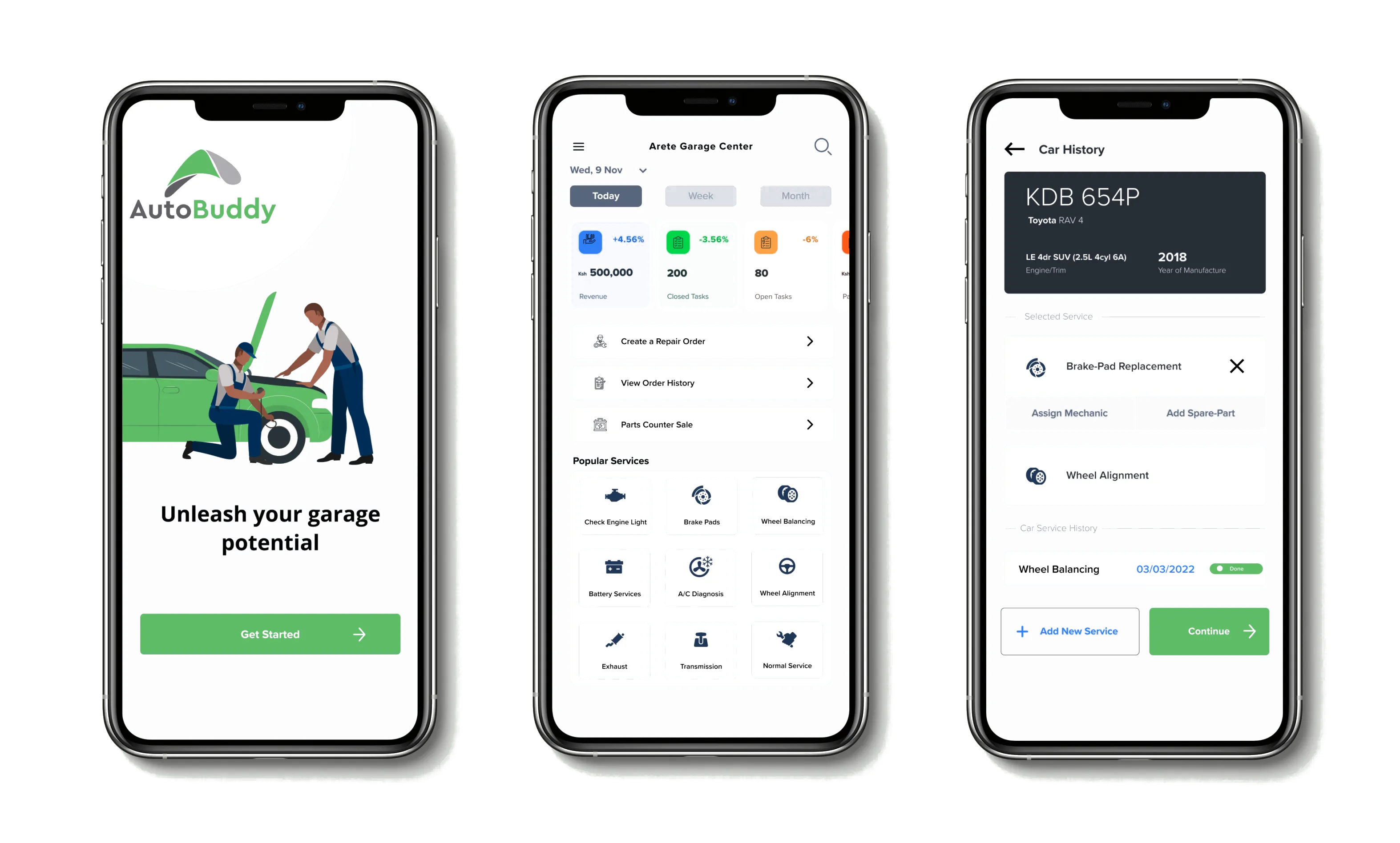
I explored how independent auto garages could move from fragmented, manual workflows to a more connected digital workspace for managing customers, vehicles, repairs, inventory and payments.
I owned the product exploration from research and problem definition through UX, prototyping and usability testing.
01 · Understanding the work
Before designing, I needed to understand the operation: the people doing the work, the workflows they followed, and the tools already in use.
Interviews, a survey, competitive analysis, and field insights revealed a fragmented environment where customers, mechanics, owners, and records were often connected through manual or disconnected processes.
02 · From research to product
The research helped identify the core areas that needed to connect, rather than treating every garage task as a separate feature.
The goal was not simply to digitize individual tasks. It was to shape a connected workspace around garage operations.
03 · Designing the experience
I translated the product system into a mobile-first experience that brought the operation's recurring workflows closer together. The idea was to build AutoBuddy as a progressive web app (PWA), allowing the same connected workspace to adapt across desktop and mobile.
Follow jobs from customer and vehicle intake through completion.
Design concept explored in the original case studyKeep parts, stock levels, and usage connected to the work.
Design concept explored in the original case studyReuse service packages instead of rebuilding common work each time.
Design concept explored in the original case studyCreate visibility across the operation from one workspace.
Design concept explored in the original case study04 · Usability testing
Three participants who had worked in or owned an auto repair or maintenance business in the prior 12 months completed a remote, moderated Think Aloud test using Figma Mirror and Lookback.
All assigned key tasks were completed. The overall System Usability Scale result was described as “good”; no numeric score was reported.
Garages repeat common services.
Common work should be reusable.
Popular Services.
Select service → automatically configure repair order.
Popular Services became the main iteration story. Testing exposed an opportunity to preconfigure pricing, taxes, inventory changes and charges, and labor charges for repeated work.
05 · My contribution
I worked across the lifecycle, connecting research, product definition, interaction design, and validation rather than treating design as a standalone phase.
Research → Insight → Opportunity → Prototype → Test → Iteration
06 · What I learned
Understanding how the garage operated made it possible to design the relationships between tasks before deciding how any single screen should work.
Task completion showed that the core flows worked, while observation revealed where the product model still needed to change.
Popular Services turned recurring work into reusable setup, reducing the need to reconstruct pricing, taxes, inventory, and labor each time.
Original case study